Sonic Pi 5 RC First Impressions with What Is Love
These are my first impressions of the Sonic Pi 5 release candidates from the perspective of a live coder who contributed a fix to the codebase while testing it.
I’ll cover the new interface, documentation workflow, some of the mathematical ideas behind the new features, and how to create your own card decks. I’ll also share my contribution process and, at the end, a gift that some people have asked me to make available so they can experiment with it.
I also tested my two Ruby gems, figurate_numbers and modular_forms, and they continue to work correctly in this version.
Preferences: First look at the new interface
The interface redesign also made a great impression on me. It feels more modern, cleaner, and more enjoyable to work with.
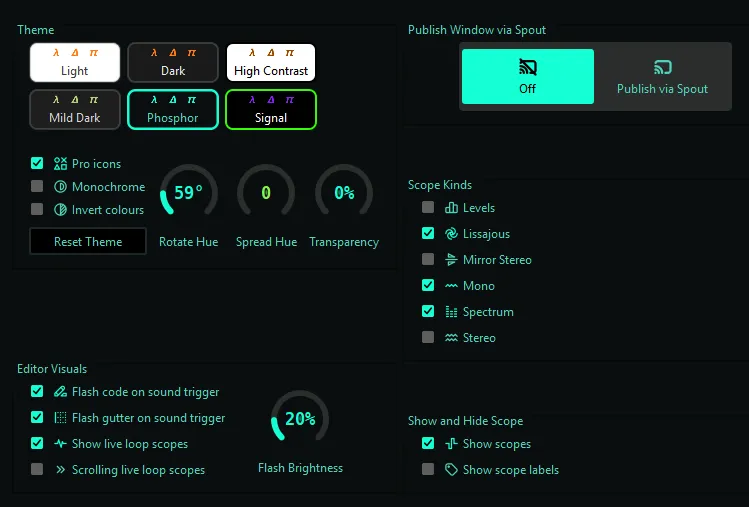
We finally have theme customization, including hue changes, transparency, monochrome, and color inversion, providing a more personalized experience. The available themes are:
| Theme | Hover description |
|---|---|
| Light | Light colour scheme |
| Dark | Dark colour scheme |
| High Contrast | High-contrast colour scheme for maximum legibility |
| Mild Dark | A softer, low contrast color scheme |
| Phosphor | A green-on-black CRT colour scheme |
| Signal | High-contrast blue-and-gold colour scheme |
I selected Phosphor for the images below. However, I think I’ll be working with Mild Dark on a daily basis, as it feels really comfortable and easy on the eyes.
In RC-4, it also displays the color percentage values and introduces a new Spread Hue option. Why ? Well, if you double-click the value, you can enter an exact number using your keyboard.
Mini-icons were introduced in RC-5.
For those who enjoy the conveniences of modern code editors, it now includes a toolbar with Cut, Copy, Paste, and, most importantly, Search.

Continuing with the interface improvements, what I found especially interesting is how the new control sliders support understanding and experimentation.
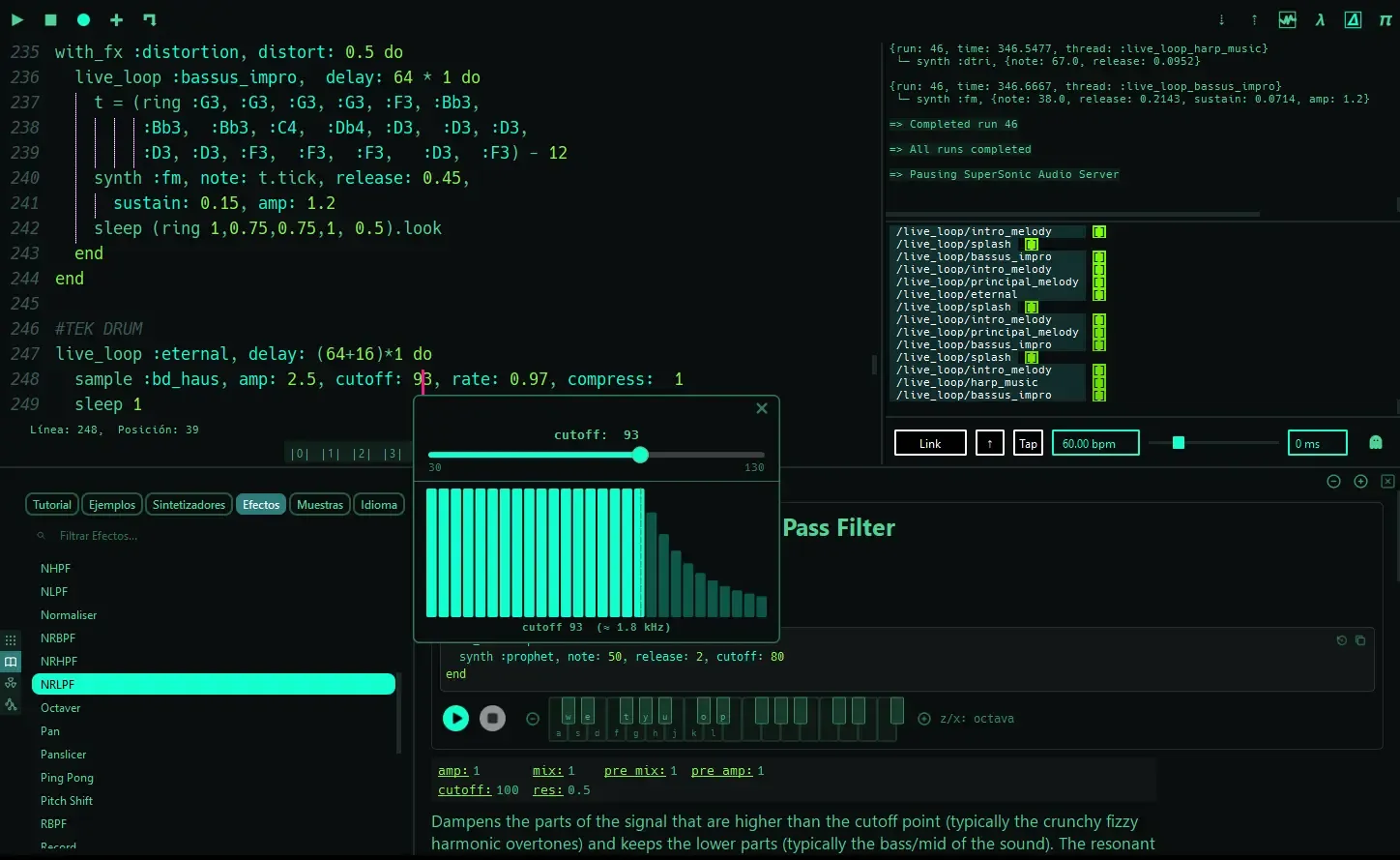
Beyond explaining the meaning of each envelope and parameter, these controls make valid ranges immediately visible, reducing trial and error and the need to consult the documentation.
For example, the visualization of phase in the Echo FX clearly defines its operating range:
This kind of feedback creates a natural connection between programming and mathematical concepts such as intervals and functions.
Likewise, the visual representation of the cutoff through bars (visible in the image above) provides an immediate view of how filtering changes the frequency range, particularly the attenuation of higher frequencies, without relying only on numerical values.
Do you want more lines for your buffer or ? It will now support up to k lines of code.
Editor Visuals
I noticed the new dynamic event visualization features added to the editor. Now, every triggered sound event can generate visual feedback through three customizable options, each with adjustable brightness:
- Flash code on sound trigger
- Flash gutter on sound trigger
- Show live loop scopes
- Scrolling live loop scopes
Most interesting is the small oscilloscope and spectrum display (bar-style visualization) attached directly to the code line. I’ll probably leave the last option disabled and use the flash brightness set to 20%, as shown in the screenshot above.
Skope Kinds
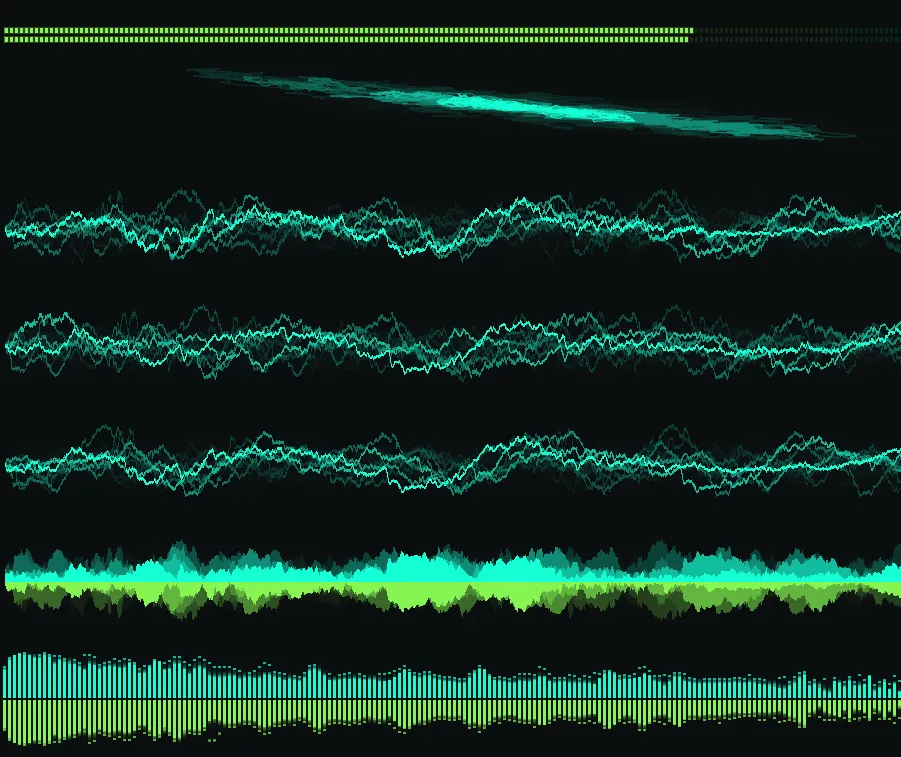
RC-4 brings together all the classic visualization modes: Mono, Spectrum, Stereo, Mirror Stereo, and Lissajous (see below), while introducing the new Levels mode.
Shortcuts
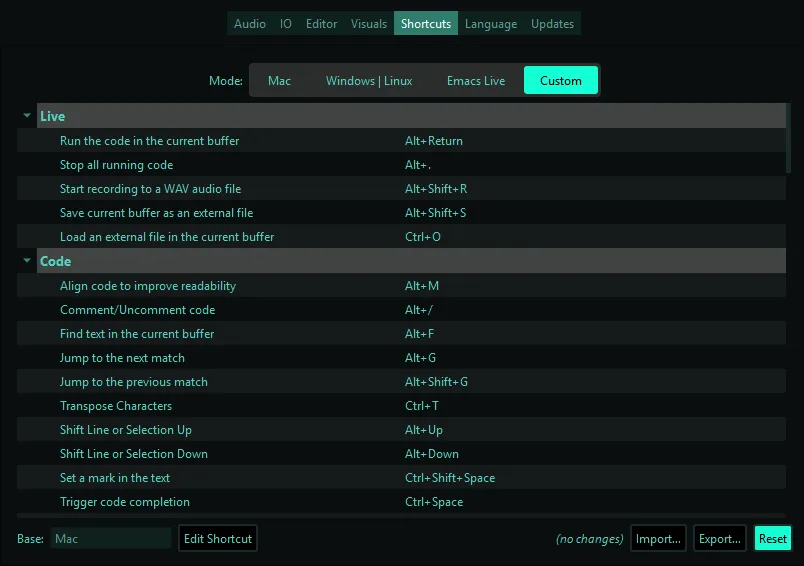
Many times you are already familiar with a specific editor, so you need to learn new shortcuts to play with SP. In this new release, we now have 4 shortcut modes:
- Mac
- Windows | Linux
- Emacs Live
- Custom
The last one can be customized from any of the three base presets, or you can use Import... and Export... to share your configuration.
Audio and Recording
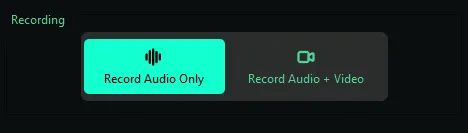
What is immediately noticeable is the possibility to record audio + video. This is superb, as it removes the need for external software to capture our sessions. There are also the audio options, such as selecting the audio device/driver, sample rate, and buffer size.
The documentation is a live learning tool
The documentation available through the help panel using the F1 key is impressive. It creates a natural bridge for people coming from music production environments, DAWs, and hardware synthesizers.
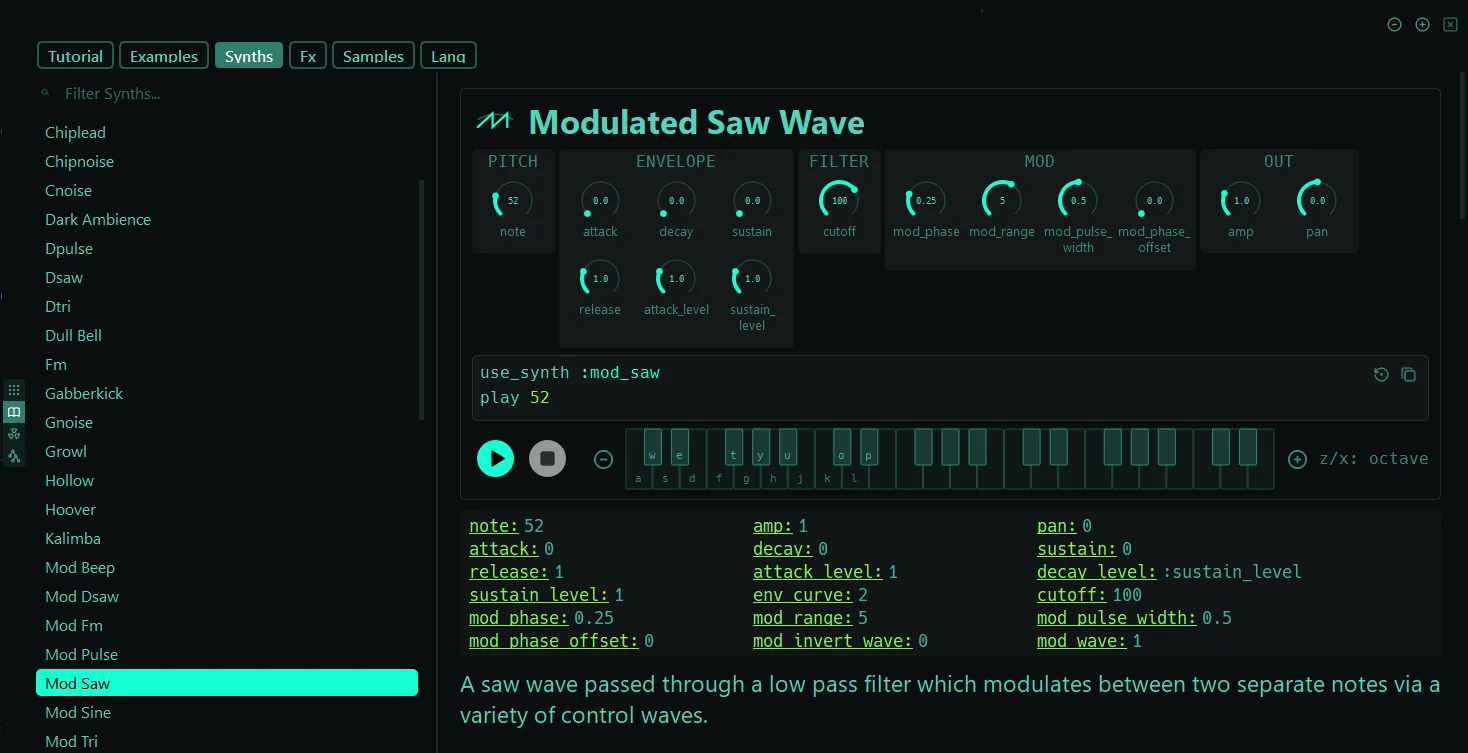
Now the docs and
f1panes are independent windows. The help pane can be moved to another monitor, allowing you to keep your live session uninterrupted while adjusting its size and zoom as needed.
The combination of code, parameter controls, knobs, and visual controllers connects familiar musical workflows with live coding, making experimentation between sound design and programming much more fluid.
For example, a mod_saw (modulated saw wave) synth allows you to explore parameters such as mod_range directly with the knob, preview the sound using the virtual keyboard, and then transfer the result into your live coding session. This workflow creates a natural path from experimentation to code.
In RC-3, autocomplete previews samples with their duration in the editor. Previously, you had to query it manually:
puts sample_duration(:arovane_beat_a)
# 14.767278911564626
Now, you see the rounded value 14.8s, which is all you need for practice and improvisation.
Fixing a Gabberkick validation issue in RC-3
This was my first direct contribution to the Sonic Pi codebase: I identified an edge case in the synth validation system and fixed the problem.
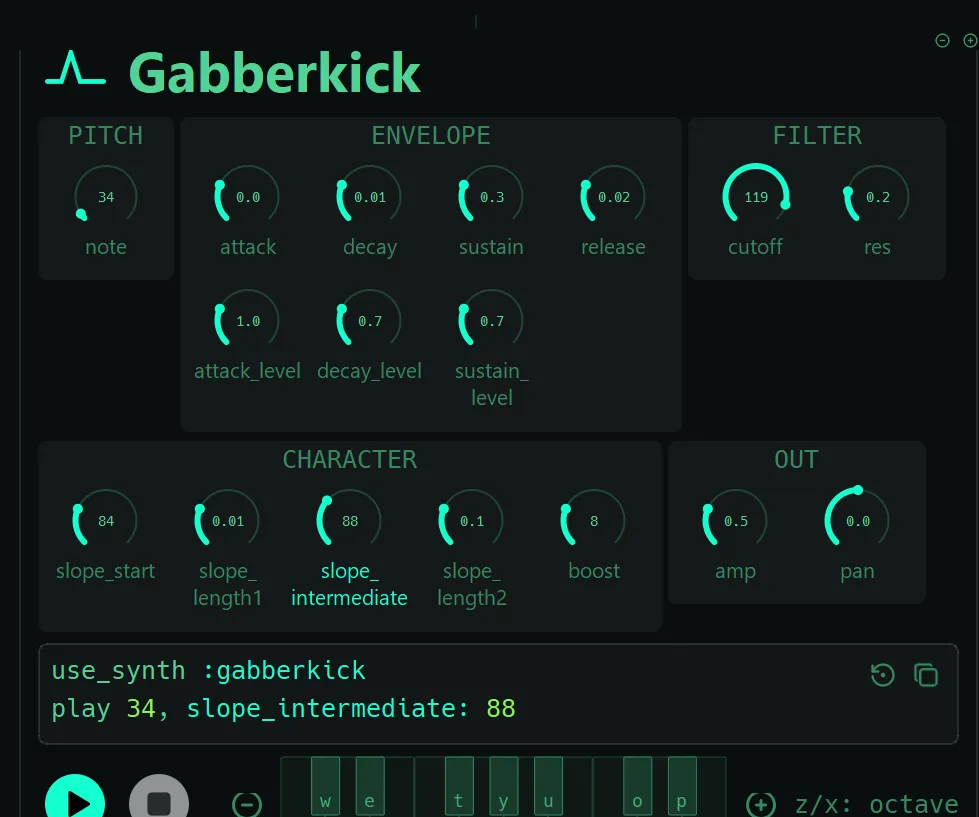
While testing the Gabberkick synthesizer from the documentation, I ran into an issue when changing the slope_intermediate parameter:
Runtime Error Sonic Pi doesn't know a function called >=
Example: play :e3, release: 0.5
Docs: play
buffer sonic-pi-tutorial-keys, line 4
NoMethodError: undefined method '>=' for nil
line 4: play 34, slope_intermediate: 88
Backtrace:
C:/Program Files/Sonic Pi BETA/app/server/ruby/lib/sonicpi/synths/synthinfo.rb:335:in 'block in SonicPi::Synths::BaseInfo#v_positive'
C:/Program Files/Sonic Pi BETA/app/server/ruby/lib/sonicpi/synths/synthinfo.rb:163:in 'block (2 levels) in SonicPi::Synths::BaseInfo#validate!'
C:/Program Files/Sonic Pi BETA/app/server/ruby/lib/sonicpi/synths/synthinfo.rb:162:in 'Array#each'
C:/Program Files/Sonic Pi BETA/app/server/ruby/lib/sonicpi/synths/synthinfo.rb:162:in 'block in SonicPi::Synths::BaseInfo#validate!'
C:/Program Files/Sonic Pi BETA/app/server/ruby/lib/sonicpi/synths/synthinfo.rb:158:in 'Hash#each'
C:/Program Files/Sonic Pi BETA/app/server/ruby/lib/sonicpi/synths/synthinfo.rb:158:in 'SonicPi::Synths::BaseInfo#validate!'
C:/Program Files/Sonic Pi BETA/app/server/ruby/lib/sonicpi/lang/sound.rb:4379:in 'SonicPi::Lang::Sound#validate_if_necessary!'
C:/Program Files/Sonic Pi BETA/app/server/ruby/lib/sonicpi/lang/sound.rb:3963:in 'SonicPi::Lang::Sound#trigger_synth'
C:/Program Files/Sonic Pi BETA/app/server/ruby/lib/sonicpi/lang/sound.rb:3887:in 'SonicPi::Lang::Sound#trigger_inst'
C:/Program Files/Sonic Pi BETA/app/server/ruby/lib/sonicpi/lang/sound.rb:1293:in 'SonicPi::Lang::Sound#synth'
C:/Program Files/Sonic Pi BETA/app/server/ruby/lib/sonicpi/lang/sound.rb:1390:in 'SonicPi::Lang::Sound#play'
sonic-pi-tutorial-keys:4:in 'block (2 levels) in SonicPi::RuntimeMethods#__spider_eval'
C:/Program Files/Sonic Pi BETA/app/server/ruby/lib/sonicpi/runtime.rb:1391:in 'Kernel#eval'
C:/Program Files/Sonic Pi BETA/app/server/ruby/lib/sonicpi/runtime.rb:1391:in 'block (2 levels) in SonicPi::RuntimeMethods#__spider_eval'
C:/Program Files/Sonic Pi BETA/app/server/ruby/lib/sonicpi/runtime.rb:1636:in 'block (2 levels) in SonicPi::RuntimeMethods#__in_thread'
According to the documentation, slope_start has a default value of 84, so I expected this to work:
use_synth :gabberkick

play 34,
  slope_intermediate: 88
However, it produced the error above. Interestingly, if I changed the slope_start value from the documentation or added it manually in the editor:
use_synth :gabberkick
play 34,
  slope_start: 84,
  slope_intermediate: 88
everything worked correctly. This meant that slope_intermediate only failed when slope_start was not explicitly provided.
To find the cause, I checked the Sonic Pi source code. The synth definitions themselves were correct, but in:
.../app/server/ruby/lib/sonicpi/synths/synthinfo.rbI found a validation error in the Gabberkick synthesizer argument metadata around line 4975:
:slope_intermediate =>
{
  :doc => "The note where the frequency passes through after `:slope_length1`, typically much nearer to the final note.",
  :validations => [v_positive(:slope_start)],
  :modulatable => false
},
The validation was referencing the wrong parameter. It should validate slope_intermediate instead of slope_start:
:slope_intermediate =>
{
  :doc => "The note where the frequency passes through after `:slope_length1`, typically much nearer to the final note.",
  :validations => [v_positive(:slope_intermediate)],
  :modulatable => false
},
After making this small change locally, the problem was fixed and slope_intermediate works correctly (editor and docs) without requiring slope_start to be explicitly provided.
Sam Aaron pointed out that this was an interesting edge case because these validations were originally written as documentation metadata, but they are now also used programmatically. As a result, small inconsistencies in them can surface during execution.
The issue was fixed in the GitHub commit:
Lang - fix gabberkick opt validations
thanks to Edgar Delgado Vega for the fix
Autocomplete ownership issue in RC-4
While testing the new autocomplete system in RC-4, I noticed a small issue with option ownership.
For example:
synth :fm, depth: 2

with_fx :tremolo, depth: 0.6 do
  play 50
  sleep 1
end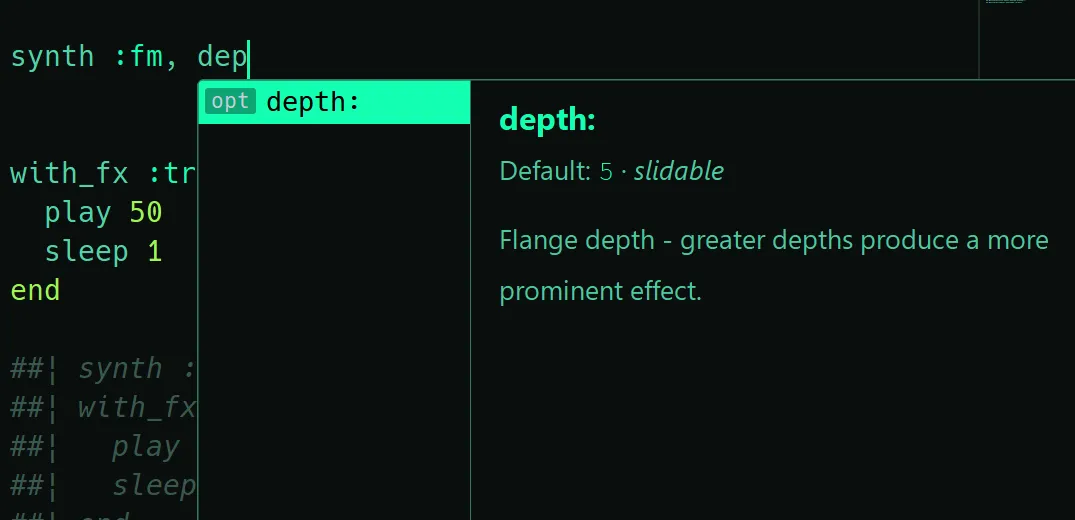
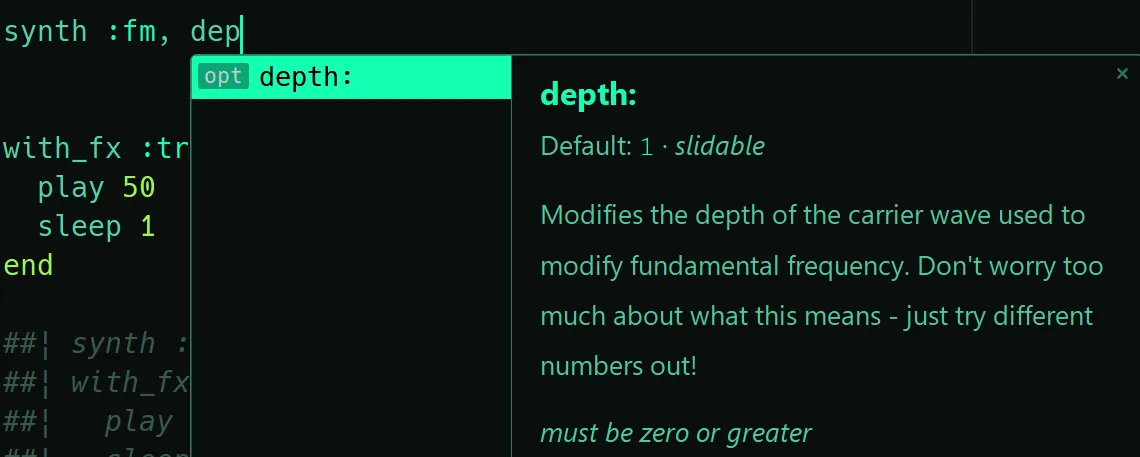
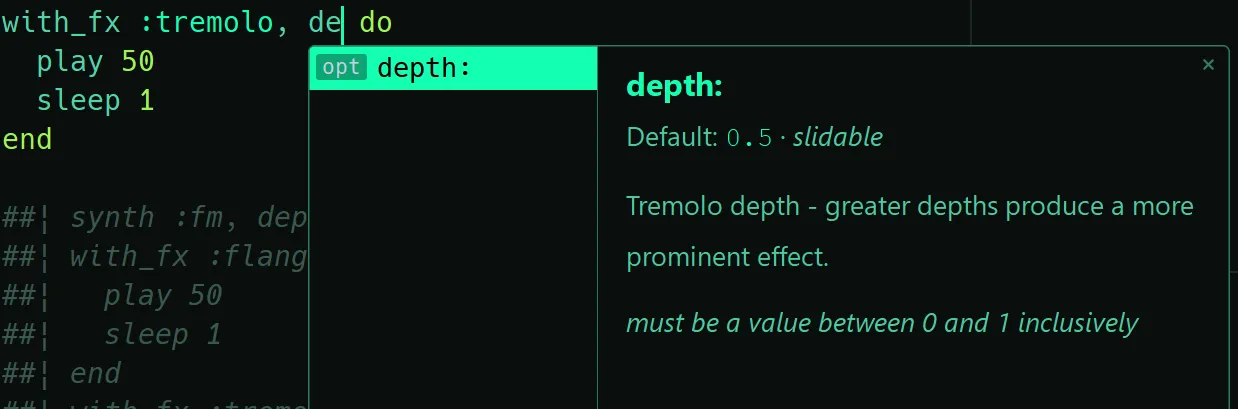
The autocomplete popup for depth was showing the documentation from the wrong owner.
In this case, the depth option from :fmwas displaying the depth documentation from :flanger. The same happened with :tremolo, which also received the :flanger documentation.
The issue seems to be that docs are currently stored globally by option name. Since multiple synths/FX share option names (depth, room, etc.), the last registered owner can overwrite the displayed docs.
A possible solution is to keep the current global docs as a fallback, but add owner-specific docs (setDocFor and setSummaryFor) when an option belongs to a particular synth or FX. I compiled Sonic Pi locally and tested the change.
The autocomplete now resolves the documentation using the current synth/FX context (see images below):
Well, let’s look at the files that need to change.
This was obviously more complicated than the previous
Gabberkickfix. The main challenge was finding where the ownership of shared options was being lost.
scintilla_api.h
I added owner-specific storage and methods.
// around line 86
void setDocFor(const QString& owner, const QString& name, const QString& doc);
void setSummaryFor(const QString& owner, const QString& name, const QString& summary);

// around line 126
QString ownerForContext(const QStringList& context) const;
QHash<QString, QString> ownerDocs;
QHash<QString, QString> ownerSummaries;
QHash<QString, OptRange> optRanges;
QHash<QString, OptRange> ownerOptRanges;
scintilla_api.cpp
I added owner-specific documentation lookup with a global fallback.
// around line 195
void ScintillaAPI::setDoc(const QString& name, const QString& doc) {
  docs.insert(name, doc);
}

void ScintillaAPI::setDocFor(const QString& owner,
                            const QString& name,
                            const QString& doc) {
  ownerDocs.insert(owner + " " + name, doc);
}

void ScintillaAPI::setSummaryFor(const QString& owner,
                                const QString& name,
                                const QString& summary) {
  ownerSummaries.insert(owner + " " + name, summary);
}

void ScintillaAPI::setUsage(const QString& name, const QString& usage) {
  usages.insert(name, usage);
}
Then, when retrieving option documentation, I first check the current owner and fallback to the global documentation if no owner-specific entry exists.
// around line 356 :: if (optOptions.contains(optBefore))
// I substitute optDoc:

const QString owner = ownerForContext(context);
const QString ownerKey = owner + " " + optBefore;

const QString optDoc = ownerDocs.contains(ownerKey)
                          ? ownerDocs.value(ownerKey)
                          : docs.value(optBefore);


// aroune line 417 :: for (const QString& n : names)
//  I replace summary and doc:

QString owner = ownerForContext(context);
QString ownerKey = owner + " " + n;

item.summary = ownerSummaries.contains(ownerKey)
                ? ownerSummaries.value(ownerKey)
                : summaries.value(n);

item.usage = usages.value(n);

item.doc = ownerDocs.contains(ownerKey)
            ? ownerDocs.value(ownerKey)
            : docs.value(n);
qt-doc.rb
The docs generator now keeps track of all owners for an option, not only those with validations.
Previously, shared options like depth were generated only by option name, so the owner information was lost before reaching the autocomplete layer. This could cause an option to show documentation from the wrong synth/FX.
The change separates:
opt_owners: all owners, used to generate owner-specific docsopt_validations: owners with validations, used for range/slider checks
# around line 342
  opt_owners = {}

#
SonicPi::Synths::SynthInfo.get_all.each do |k, v|
  next unless v.is_a? SonicPi::Synths::FXInfo
  next if (k.to_s.include? 'replace_')
  safe_k = k.to_s[3..-1]
  docs << "  // fx :#{safe_k}\n"
  docs << "  fxtmp.clear(); fxtmp "
  v.arg_info.each do |ak, av|
    docs << "<< \"#{ak}:\" ";
    opt_summaries[ak] ||= av if av[:doc]

    # All owners, even without validations (for owner-scoped docs)
    (opt_owners[ak] ||= []) << [":#{safe_k}", av]

    # Only owners with validations (for slider safety)
    if (vals = (v.info[ak] || {})[:validations])
      (opt_validations[ak] ||= []) << [":#{safe_k}", av, vals]
    end
  end
  docs << ";\n"
  docs << "  autocomplete->addFXArgs(\":#{safe_k}\", fxtmp);\n"
  docs << "  autocomplete->setSummary(\":#{safe_k}\", QString::fromUtf8(\"#{summary_clean.call(v.name)}\"));\n"
  fx_doc = Kramdown::Document.new(v.doc.to_s.strip).to_html + opts_html.call(v.arg_info)
  docs << "  autocomplete->setDoc(\":#{safe_k}\", #{qutf8_doc.call(fx_doc)});\n\n"
end

SonicPi::Synths::SynthInfo.get_all.each do |k, v|
  next unless v.is_a? SonicPi::Synths::SynthInfo
  docs << "  // synth :#{k}\n"
  docs << "  fxtmp.clear(); fxtmp "
  v.arg_info.each do |ak, av|
    docs << "<< \"#{ak}:\" ";
    opt_summaries[ak] ||= av if av[:doc]

    # All owners, even without validations (for owner-scoped docs)
    (opt_owners[ak] ||= []) << [":#{k}", av]

    # Only owners with validations (for slider safety)
    if (vals = (v.info[ak] || {})[:validations])
      (opt_validations[ak] ||= []) << [":#{k}", av, vals]
    end
  end
  docs << ";\n"
  docs << "  autocomplete->addSynthArgs(\":#{k}\", fxtmp);\n"
  docs << "  autocomplete->setSummary(\":#{k}\", QString::fromUtf8(\"#{summary_clean.call(v.name)}\"));\n"
  synth_doc = Kramdown::Document.new(v.doc.to_s.strip).to_html + opts_html.call(v.arg_info)
  docs << "  autocomplete->setDoc(\":#{k}\", #{qutf8_doc.call(synth_doc)});\n\n"
end

## opt_summaries ::

opt_summaries.each do |ak, info|
  # HTML, like the synth/fx docs, for consistent block spacing.
  meta = []
  ds = fmt_default.call(info[:default])
  meta << "Default: <code>#{ds}</code>" if ds
  meta << "<i>slidable</i>" if info[:slidable]
  body = ""
  body += "<p>#{meta.join(' · ')}</p>" unless meta.empty?
  d = info[:doc].to_s.strip
  body += "<p>#{opt_doc_html.call(d)}</p>" unless d.empty?
  # Describe the opt's constraints (straight from the engine's validations) so the
  # value is self-documenting — e.g. "must be zero or greater; must be less than 1".
  cons = info[:constraints] || []
  body += "<p><i>#{opt_doc_html.call(cons.join('; '))}</i></p>" unless cons.empty?
    # Generic fallback (used when there is no owner-specific match).
  docs << "  autocomplete->setSummary(\"#{ak}:\", QString::fromUtf8(\"#{ak}:\"));\n"
  docs << "  autocomplete->setDoc(\"#{ak}:\", #{qutf8_doc.call(body)});\n"

  # Owner-scoped docs: the same opt name can have different meanings depending
  # on the synth/FX that owns it (e.g. room: on :reverb vs :gverb).
  (opt_validations[ak] || []).each do |owner, oinfo, _vals|
    owner_body = ""
    owner_meta = []

    owner_default = fmt_default.call(oinfo[:default])
    owner_meta << "Default: <code>#{owner_default}</code>" if owner_default
    owner_meta << "<i>slidable</i>" if oinfo[:slidable]

    owner_body += "<p>#{owner_meta.join(' · ')}</p>" unless owner_meta.empty?

    owner_doc = oinfo[:doc].to_s.strip
    owner_body += "<p>#{opt_doc_html.call(owner_doc)}</p>" unless owner_doc.empty?

    owner_cons = oinfo[:constraints] || []
    owner_body += "<p><i>#{opt_doc_html.call(owner_cons.join('; '))}</i></p>" unless owner_cons.empty?

    docs << "  autocomplete->setSummaryFor(\"#{owner}\", \"#{ak}:\", QString::fromUtf8(\"#{ak}:\"));\n"
    docs << "  autocomplete->setDocFor(\"#{owner}\", \"#{ak}:\", #{qutf8_doc.call(owner_body)});\n"
  end
This is the complete approach I tested locally.
Since this touches scintilla_api.h, scintilla_api.cpp, and qt-doc.rb, I wanted to share the idea first and get Sam Aaron’s thoughts through the community.
This autocomplete issue was fixed by the following commit:
GUI - autocomplete: resolve opt docs, enum values and ranges per owner
Thanks to Edgar Delgado Vega for reporting this.
New scales, chords and methods
Using puts scale_names, I found some new scales available in this version, some of which are only new aliases:
(ring
    :acoustic
    :altered
    :byzantine
    :double_harmonic
    :lydian_dominant
    :phrygian_dominant
    :sababin
)
Likewise, with puts chord_names, shows some new chord options, with a few entries being aliases.
(ring
    '7+9'
    '9-5'
    'mM7'
    'maj7'
    'maj13'
    'major11'
    'major6'
    'major9'
    'minor11'
    'minor13'
    'minor6'
    'minor9'
    'minor_major7'
    'mmaj7'
)
I noticed an improvement in the explanation of play_pattern and play_pattern_timed in Tutorial section 8.2.
There is also a new method in section 8.5 for ring chains called invert_around.
puts (ring 60, 64, 67).invert_around(:e4) # or 64
# (ring 68.0, 64.0, 61.0)
Mathematically, if is a note and is the pivot note (MIDI value or :symbol), the inversion is defined by
Equivalently, letting denote the signed distance from to ,
Geometrically speaking, this is the reflection of the note across the pivot note , which acts as the axis of symmetry. Try another note and verify the result yourself.
Card Decks: A Tutorial
The functionality to create your own decks was removed in the latest RCs. Sam Aaron explained why in this comment on LinkedIn:
Also, the quickstart card loading functionality was dev-only - I’ve not put enough thought into the file format and features yet to open that up fully - so it won’t feature in v5.
Removed steps for v5
The following steps show how this dev-only functionality worked before it was removed.
In the Menu → Examples, there is a QuickStart Cards option that opens a panel with code snippet cards. These cards allow you to copy the snippet, drag it into the code editor, and listen to it with a play button, among other features. In fact, this is a wonderful educational tool. Here I’ll show you how to create your own.
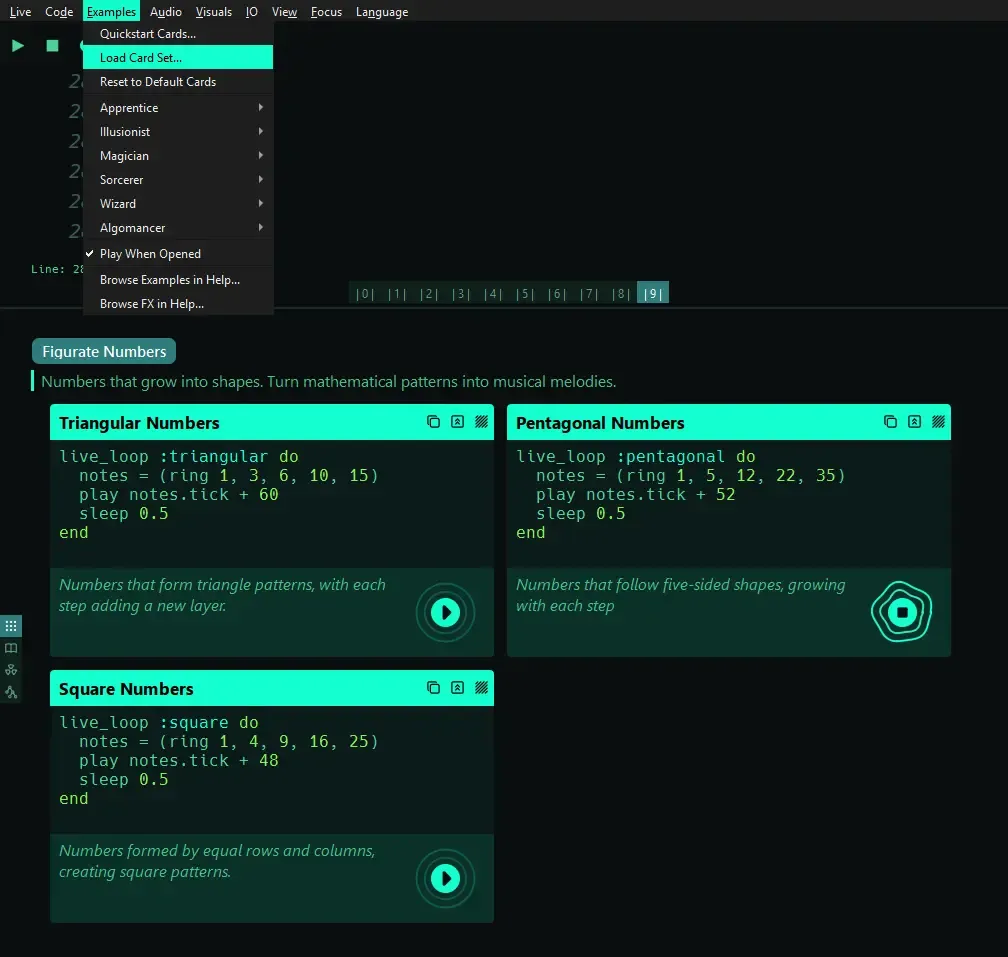
Card decks are independent windows, like the
F1help panels
To create a personalized card deck, go to Examples → Load Card Set… and create a my-example-deck.txt file. If you try to open an empty file or one with an invalid format, you will see this message:
my-example-deck.txt is not a valid card set.
No card decks were found.
A card set needs at least one "Deck: name" line followed by "## Card title" cards
The format I will use for my own figurate-numbers.txt card deck is based on polygonal numbers
# Deck: Figurate Numbers

Numbers that grow into shapes. Turn mathematical patterns into musical melodies.

## Triangular Numbers

Numbers that form triangle patterns, with each step adding a new layer.

```
live_loop :triangular do
  notes = (ring 1, 3, 6, 10, 15)
  play notes.tick + 60
  sleep 0.5
end
```

## Square Numbers

Numbers formed by equal rows and columns, creating square patterns.

```
live_loop :square do
  notes = (ring 1, 4, 9, 16, 25)
  play notes.tick + 48
  sleep 0.5
end
```

## Pentagonal Numbers

Numbers that follow five-sided shapes, growing with each step.

```
live_loop :pentagonal do
  notes = (ring 1, 5, 12, 22, 35)
  play notes.tick + 52
  sleep 0.5
end
```
Simply keep the same structure and change the deck names, card titles, descriptions, and Sonic Pi snippets.
A single
.txtfile can contain multiple# Decksections with multiple## Cardexamples inside each one.
Phase and the oscilloscope
One of the interesting parameters we can explore with the Sine synth is phase_offset. It lets us choose where the waveform starts inside its cycle.
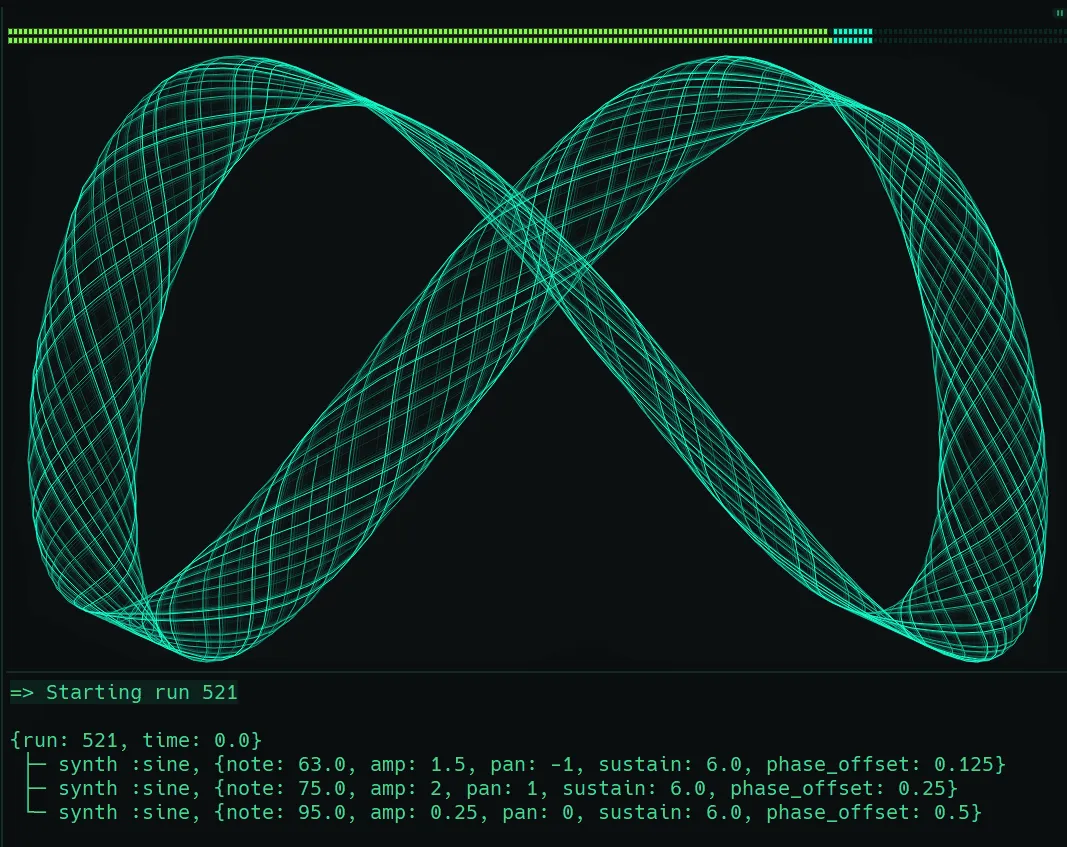
Using the triangular number idea from the deck section, you can play with different phase relationships and see their Lissajous patterns in the figure above:
triangular_notes = (ring 1, 3, 6, 10, 15, 21, 28, 35)
use_synth :sine

play triangular_notes[1] + 60,
  amp: 1.5, pan: -1,
  sustain: 6, phase_offset: 0.125

play triangular_notes[4] + 60,
  amp: 2, pan: 1,
  sustain: 6, phase_offset: 0.25

play triangular_notes[7] + 60,
  amp: 0.25, pan: 0,
  sustain: 6, phase_offset: 0.5
The value goes from to , representing a fraction of a complete cycle (as mentioned in the docs). Since one cycle corresponds to , we can express the phase angle as:
Well, let’s make an -step conversion table.
phase_offset | Fraction of cycle | Degrees | Radians |
|---|---|---|---|
0 | |||
0.125 | |||
0.25 | |||
0.375 | |||
0.5 | |||
0.625 | |||
0.75 | |||
0.875 | |||
1 |
Note that mathematically phase_offset: 1 is equivalent to phase_offset: 0.
SuperSonic, node tree and live metrics
For me, one of the most impressive things is the new SuperSonic audio backend. I haven’t explored the full codebase yet, but the ideas behind it are fascinating. The new audio architecture gives us a much more engineering-oriented view of what is happening internally. The panel now shows the live audio node tree.
| Panel | Metrics |
|---|---|
| ENGINE | Version, Rate, Block, Channels, Ticks |
| OSC | Sent, Recv In, RT Out, NRT Out |
| CLOCK | Tempo, Beat, Phase, Playing, Peers |
| DSP | Load, Peak, Overruns |
| LINK AUDIO | In, Underruns, Buffered, Drift, Publish |
| SCSYNTH | Msgs, Queue, Max-Last, Late Age, Debug |
| BUFFERS | SynthDefs, Buffers, Buf Bytes |
| ERRORS | Dropped, Q Drop, Seq Gaps, Lates, Corrupt |
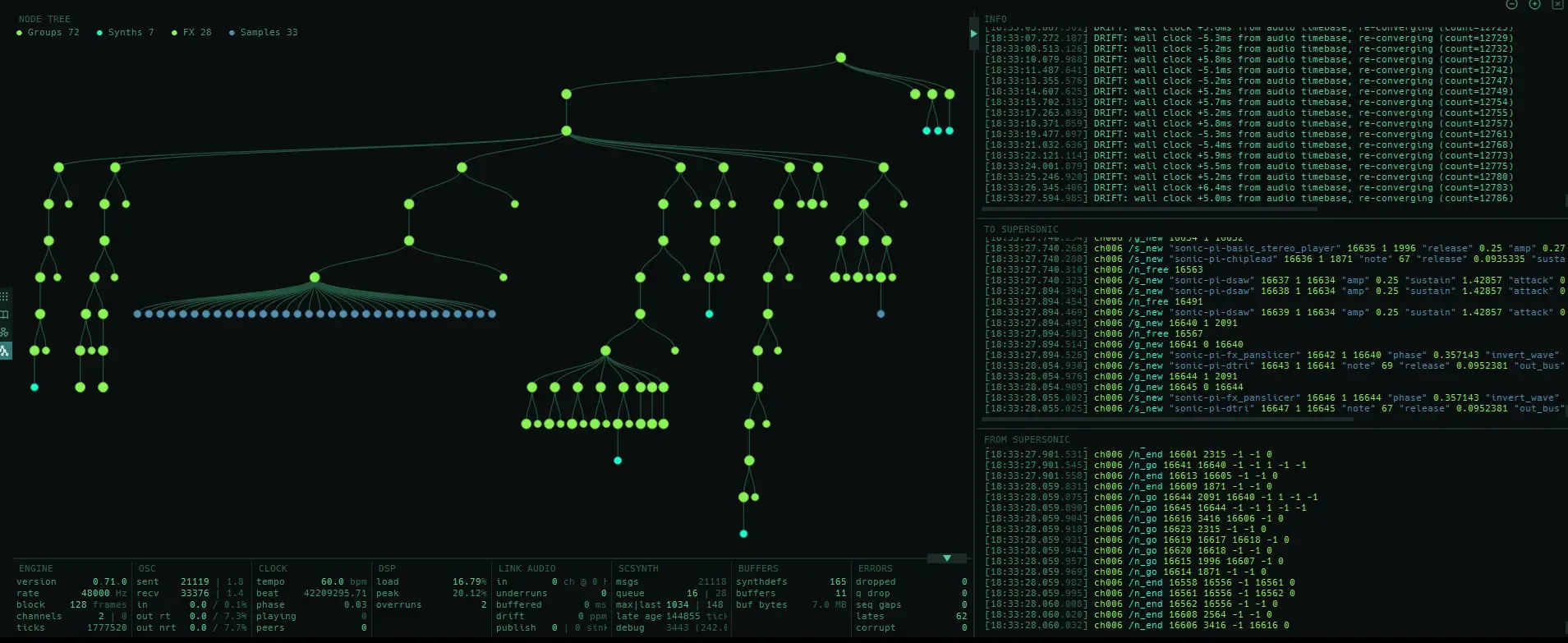
We can also observe Groups, Synths, FX, and Samples interacting in real time within this graph structure. This makes it much easier to trace the flow of audio and see how the different components are connected during a performance.
And what you are seeing in the image above is exactly What Is Love. At the beginning of the track, the sample counter is still at zero. Now, as promised, here comes the gift.
Performance and code
After exploring the internals, it’s time to turn those ideas into music. I revisited my adaptation of “What Is Love” (Haddaway), originally created several years ago (2021), as a final example of what can be built with Sonic Pi.
Use the copy button to quickly try the code in your own live coding session.
##| What Is Love (HADDAWAY) for Sonic Pi
##| Coded by Edgar Delgado Vega

use_bpm 126

##| ARP
with_fx :reverb, mix: 0.5, room: 0.85 do
  with_fx :distortion, distort: 0.4 do
    live_loop :intro_melody do
      use_random_seed dice(4)
      a = (ring :Bb4, :A4, :Bb4, :G4)
      b = (ring :Bb4, :A4, :Bb4, :F4)
      c = (ring :A4, :G4, :A4, :F4)
      synth :chiplead, note: (knit a.tick, 8, b.look, 8, c.look, 16).look,
        release: rrand(0.15, 0.25), sustain: 0.1, attack: 0,
        decay: 0, amp: 0.4
      sleep 0.5
    end
  end
end

##|HARMONY
with_fx :reverb, mix: 0.5, room: 0.9 do
  live_loop :chords, delay: 16, sync: :intro_melody do
    with_fx :slicer, phase: 0.75 do
      use_synth :dsaw
      chordas = [(ring :G4,:BB4,:D4), (ring :F4,:BB4,:D4),
                 (ring :F4,:A4,:D4), (ring :F4,:A4,:C4)].tick
      play chordas, amp: 0.75, sustain: 3, attack: 0.25,  release: 0.25
      sleep 4
    end
  end
end

##|SPLASH
with_fx :panslicer, invert_wave: 1, phase: 1.0/4 do
  live_loop :splash,  delay: 32 * 1 do
    use_random_seed 43
    sample :ambi_lunar_land, release: 0.25, amp: rrand(0.08,0.12)*1
    sleep 0.5
  end
end

##| BEEPFUSION
with_fx :reverb, mix: 0.3, room: 0.7 do
  with_fx :echo, mix: 1, phase: 0.5 do
    live_loop :harp_music, delay: 48*1 do
      use_random_seed 123
      8.times do
        tick
        with_fx :panslicer, phase: 0.75, invert_wave: [1,0].choose do
          p = (ring :G4, :Bb4, :A4, :F4)
          synth :dtri, note: p.choose, release: 0.2
          sleep (ring 0.25,0.75,0.5).look
        end
      end
    end
  end
end

##| BASS GROOVE
with_fx :distortion, distort: 0.5 do
  live_loop :bassus_impro,  delay: 64 * 1 do
    t = (ring :G3, :G3, :G3, :G3, :F3, :Bb3,
         :Bb3,  :Bb3, :C4,  :Db4, :D3,  :D3, :D3,
         :D3, :D3, :F3,  :F3,  :F3,   :D3,  :F3) - 12
    synth :fm, note: t.tick, release: 0.45,
      sustain: 0.15, amp: 1.2
    sleep (ring 1,0.75,0.75,1, 0.5).look
  end
end

##| TEK DRUM
live_loop :eternal, delay: (64+16)*1 do
  sample :bd_haus, amp: 2.5, cutoff: 93, rate: 0.97, compress:  1
  sleep 1
end

##| DRUMS
live_loop :bom, delay: (64 + 32)*1 do
  sample :bd_sone, amp: 1, compress: 1, rate: 1.7
  sleep 1
  with_fx :reverb, mix: 0.2, room: 0.14 do
    sample :sn_dolf,  amp: [1,1].tick
    sleep 1
  end
end

##| SING THE MELODY
with_fx :reverb, room: 0.5, mix: 0.8 do
  with_fx :ping_pong, mix: rrand(0.55,0.6), amp: 0.5, phase: 0.25 do
    with_fx :echo, phase: 0.25, mix: 0.5, pre_mix: 1, max_phase: 1, decay: 1.5 do
      with_fx :distortion, mix: 0.2, distort: 0.8 do
        live_loop :principal_melody, delay: (64 + 64)*1 do
          melody = [:r, :D4, :Eb4, :D4, :F4, :D4,
                    :D4, :F4, :D4, :D4, :C4, :D4, :F4, :G4]
          sleep_m = [2,0.5,0.5,0.5,1,2.5,0.5,1,2.5,0.5,3,0.5,0.5,0.5].ring
          synth :supersaw, note: melody.tick, amp: 0.6, release: 0.35, sustain: 0.2
          sleep sleep_m.look
        end
      end
    end
  end
end
Closing thoughts
Many thanks to Sam Aaron and the entire community, especially everyone taking part in the community discussion, for continuing to shape and evolve this amazing creative instrument.
It has been fantastic to follow these Sonic Pi v5 RCs so closely, almost commit by commit.
Greetings from far, far away!
Table of Contents